Voicemaster
Create temporary voice channels which can be customized to your liking.
Getting started
To get started with voicemaster feature, you need to run the setup command.
,voicemaster setup
The command will create two channels:
- A text channel to control the voice channel with an interface.
- A voice channel where users can join to create their own voice channel.
What is the interface channel?
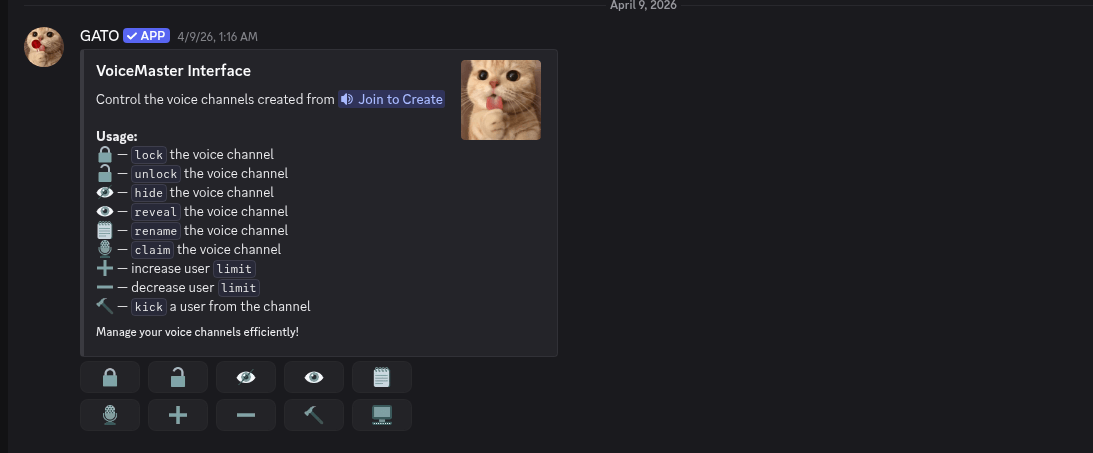
The #interface channel will contain an embed with buttons that allow members to customize their temporary voice channel. This channel should be locked to keep the embed message at the top of the channel.
What is the Join to Create channel?
The Join to Create channel is a voice channel where users can join to create their own temporary voice channel. Joina and your new channel will be created
More about configuration
The configuration with the setup is already enough, the bot will automatically create the channels with the good permissions, but also choose when you join the best region, the best bitrate and more.
Note:
The name of the channels created will always follow the format {user.displayname}'s voice channel. and the category will be set as Voice
Channels. You can change the channels and category names to your liking
directly using discord.
Customize your temporary channel !
Using the interface button, you can customize your temporary voice channel.
| Button | Feature |
|---|---|
| Lock | Lock/unlock the channel |
| Unlock | Unlock/lock the channel |
| Ghost | Hide the channel for everyone |
| Unghost | Unhide the channel for everyone |
| Increase limit | Increase the user limit of the channel |
| Decrease limit | Decrease the user limit of the channel |
| Claim | Transfer ownership of the channel |
| Transfer | Transfer ownership of the channel |
| Rename | Rename the channel |
| Kick | Kick a user from the channel |
There is also textual commands to do the same, and they have the same name.
Rename your channel
With the text command ,rename or by using the rename button, you can rename your channel.
,voicemaster rename [new_name]
Change limit
,voicemaster limit [limit]
Make your channel private
You can make your channel private using two methods. Ghost and unghost method make the channel totally invisible for others while lock and unlock method only remove the ability to join the channel.
Lock :
,voicemaster lock
Unlock :
,voicemaster unlock
Ghost :
,voicemaster ghost
Unghost :
,voicemaster unghost
Permit specific members to join
You can permit specific members to join your channel using the permit command.
,voicemaster permit @user1
Claim a channel
If the owner leaves the channel, you can claim the channel using the claim command.
,voicemaster claim
Transfer channel ownership
You can also transfer the ownership of your channel to another user using the transfer command.
,voicemaster transfer @user1
More
If you want to enjoy your music, you can make the temp voice channel a music. It revoke all speak permissions for users in the channel. Run this command to make it a music channel:
,voicemaster music
The command is a toggle, so you can run it again to disable music mode.